Export Your Library as Markdown Files
PastReads allows you to export your entire reading library as markdown files, creating a portable and flexible archive of your highlights and notes. When you export your library, each source (book, article, etc.) is saved as a separate markdown file. This makes it simple to import your highlights into other tools that support Markdown, like NotebookLM, or to create backups for offline reading.
Markdown export is a PastReads Pro feature
How to Export
Navigate to the Export page in your PastReads dashboard
Scroll down to the Markdown Export section
Click the "Export Library" button
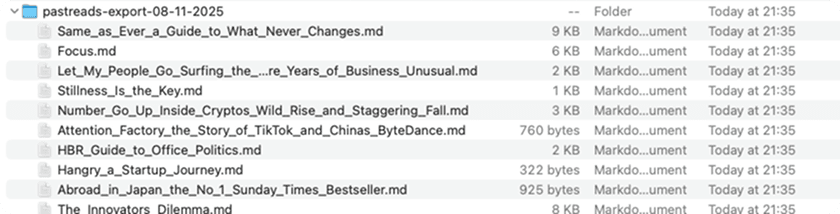
Your browser will automatically download a ZIP file containing all your markdown files
The export process is quick and the ZIP file will be named pastreads-export-DD-MM-YYYY.zip.
What Gets Exported
PastReads exports your complete reading library with full fidelity:
- 📚 All Sources: Books, articles, and any other sources from your PastReads library
- 📖 Source Metadata: Title, author, type, URL, and creation date
- 🔍 Highlights: Complete text with original formatting preserved
- 📝 Notes: Both standalone notes and notes attached to highlights
Export File Structure
ZIP Archive Contents
The exported ZIP file contains one markdown file for each source in your library. Files are named using the source title, with special characters removed and spaces converted to underscores (e.g., Name_of_Book.md).
Markdown File Format
Each source file follows a consistent markdown structure:
Source Header
# Source Title

**Author:** Author Name
**Type:** Book/Article/etc.
**URL:** https://example.com
**Created:** DD/MM/YYYY
Highlights Section
Highlights are formatted as blockquotes with location information:
## Highlights

> This is the highlighted text with full formatting preserved.

*Location: 2297-2299*

**My Note:** This is a note attached to the highlight.
*Location: 2297*

---

> Parent highlight text [..] child highlight text [..] another child highlight.

**My Note:** This is a note attached to any of the (merged) highlights.
*Location: 2812*

---

> Another highlight from the same source.

---
Standalone Notes Section
Notes not linked to any specific highlights appear in a separate section:
## Notes

- **Standalone Note:** This is a standalone note about the source.

- **Standalone Note:** This is another standalone note.
Troubleshooting
To ensure system stability, you can export to markdown 4 times per hour.
Need any support?
If you encounter any issues with markdown export, please contact our support team. We're here to help ensure your reading insights are properly exported and accessible in the format you need.
Text share on iOS
Learn how to save selected text on iPhone and iPad with PastReads using the iOS Share Sheet, especially from Safari and other supported apps.
Notion
Learn how to export your PastReads library to Notion. Create a structured database of your highlights and notes organized by source with rich formatting and metadata.